Free42 : An HP-42S Calculator Simulator
Home > Free42
What it is
Free42 is a re-implementation of the
HP-42S Scientific Programmable Calculator and HP-82240 Printer.
It is a complete rewrite, not using any HP code. It does not require
an HP-42S ROM image.
Even though it contains significant enhancements compared to the
original calculator, Free42 remains fully compatible with the HP-42S,
both in its user interface and in its ability to run programs
written for the HP-42S.
Free42 is an Open Source project. The executables and source code are
released under the terms of the GNU
General Public License, version 2.
All third-party code used in Free42 is either in the public domain, or
licensed under terms compatible with GPLv2, or used with the authors'
permission.
Project Status
| Plus42
Plus42 is Free42 with: Big display, algebraic expressions, attached units, directories, TVM, and 2D function plotting.
Visit the Plus42 page to learn more. |
The latest release is 3.3.12.
If you're interested in what's been going on with Free42,
see the project history.
If you have questions or comments about Free42, you may use the Free42 & Plus42 discussion group.
Alternatively, you can contact me, Thomas Okken, via email at thomas@thomasokken.com.
You can find answers to some frequently asked questions in the Free42 FAQ.
Also on this web site: Plus42, an enhanced version of Free42.
Donations
If you like Free42 and use it regularly, or if you simply want to sponsor
the Free42 project, please make a donation.
You may donate any amount you wish, large or small.
Donations are processed by PayPal.
Page Contents
Downloads
Documentation
Frequently Asked Questions
Downloads
 |
Android
Get it at Google Play,
or if you prefer the manual approach, download Free42Android.apk
for side-loading.
Requires Android 4.4 or later.
|
 |
iOS (iPhone, iPad, iPod touch)
Get it from the App Store.
Requires iOS 12.0 or later.
|
 |
Windows
Download: Free42Windows.zip
(32-bit)
Requires Windows Vista or later.
If Free42 does not run as is, you will also need to download and install the
Latest supported Visual C++ Redistributable.
For Windows versions before 10, you need older versions of the Visual C++ redistributable,
which you can find here.
|
 |
MacOS
Download: Free42Mac.zip
Requires MacOS 10.13 (High Sierra) or later.
|
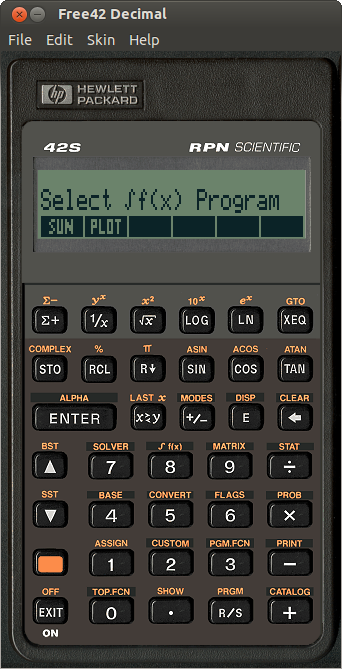 |
Linux
Download: Free42Linux.tgz
Built in Ubuntu 18.04, with libc 2.27, libstdc++ 8.4.0, and GTK+ 3.22.30
It should work on any Linux (x86_64) with those or similar libraries.
|
Additional Downloads
|
 |
Skins
Some skins to use instead of the faceplates built into Free42.
|
 |
HP-42S/Free42 programs
A small collection of HP-42S/Free42
programs. |
 |
raw2txt, txt2raw
Command-line tools that convert "raw" program files to text listings and back.
Downloads for Windows,
MacOS,
and Linux.
Last Updated: Apr 26 2025
Note: These tools do not handle Plus42 instructions. If you need to be able to
convert Plus42 programs, find the Plus42-compatible versions
here.
|
 |
rom2raw
A C program that converts user code from HP-41 ROM images, from ROM or MOD files,
to Free42/Emu42 compatible "raw" program files.
Download rom2raw.zip; source code
and Win32 console executable included.
|
 |
Free42 Source Code
Get it from Codeberg: https://codeberg.org/thomasokken/free42
Package for GTK only, no HP logo, for building Linux packages: upstream.
I cannot keep track of exactly which combinations of tools do and don't work for building
Free42, but for what it's worth, these are the ones I use:
- For the Android version, I use Android Studio 2025.1.3 with the Android 15.0 SDK
(API level 35) and NDK r19c.
- For the iOS and MacOS versions, I always use the latest Xcode.
- For the Windows version, I use Microsoft Visual Studio 2026 with the VS 2022 SDK (v143).
- I have built the GTK version in many different Linux distros, and
also in FreeBSD and Solaris. What I typically need to install are: the
standard set of build tools (called 'build-essential' in Ubuntu),
libgtk-3-dev, libasound2-dev, and, if 'make' is not GNU Make, also
'gmake'. Note that libasound2-dev is optional; you just need it if you
want BEEP and TONE to sound nice.
|
 |
Old and Unsupported Versions
This section contains old and no longer supported versions of Free42 for obsolete
platforms: PalmOS, PocketPC / Windows Mobile, MacOS Dashboard, and Windows XP,
and no longer supported utilities for working with raw program files.
The full list, with download links, is here.
|
Free42 Documentation
Contents
Manual
There is no manual for Free42 per se, but since it is an accurate
simulation of the HP-42S, the original HP-42S
Owner's Manual
should be adequate for most purposes. I also recommend the Alternative HP-42S/Free42 Manual, written
by José Lauro Strapasson and Russ Jones; you can get it here, in PDF and Word formats. Finally, the
HP-42S
Programming Examples and Techniques book is a great source of advanced
programming advice and inspiration.
The User Interface functionality that is specific to Free42, e.g. printer
emulation, skin switching, etc., is fairly simple and should be
self-explanatory, but Free42 also has extended functionality in the calculator
simulation: program import/export, time and date functions, configurable
word size for BASE functions, enhanced debugging functions, local variables,
and access to the accelerometer / GPS / compass on Android and iOS devices.
These are all documented below.
Loading and Saving Programs
Loading and saving programs is possible in all Free42 versions.
The exact process is pretty straightforward in the desktop versions
(Windows, MacOS, Linux), but it is a bit more complicated on mobile devices.
For instructions for all versions, see here.
Starting with release 2.0, you can use Copy and Paste to get programs into and
out of Free42. In PRGM mode, Copy puts a text representation of the current program
onto the system clipboard, and Paste takes a text representation of a program
from the clipboard and loads it as the last program. This works in all Free42
versions, including mobile.
The Hidden Powers of Copy and Paste
Basic Copy and Paste, handling real and complex scalars, has been a feature of
Free42 since its early days. In version 2.0, however, the capabilties of Copy
and Paste were greatly improved, now handling all the types of data that the
calculator supports.

Scalars
Real and complex numbers are copied from the X register at full precision.
If the Localized Copy & Paste option is checked (in Preferences),
the number is formatted with decimal and separators according to the host
operating system's number format settings; if it is unchecked, numbers are copied
without thousands separators, and with a decimal point or comma according
to the RDX. or RDX, setting in the DISP menu. Complex
numbers are copied with the notation matching the RECT or POLAR
setting in the MODES menu: a+bi in RECT mode, and
r ∠ θ in POLAR mode.
When pasting scalars, periods and commas are interpreted according to the
host operating system's number format settings if the Localized Copy & Paste
is checked, or according to the RDX. / RDX,
setting otherwise. Thousands separators are permitted but
ignored. Complex numbers are recognized in several formats: a+bi,
a+bj, and (a, b) representing the rectangular form, and
r ∠ θ and r ∡ θ representing the polar form.
Strings
Strings are copied and pasted from and to the X register, with no length limit,
and from and to the ALPHA register (while in ALPHA mode) up to the
full 44-character ALPHA register length. When copying, characters are converted from the
HP-42S encoding to Unicode where possible, the only exceptions being the HP-42S
characters LF and
EC, which have no
equivalents in Unicode, and are translated to [LF] and [ESC]. When
pasting, Unicode characters that can't be mapped to HP-42S characters are
replaced by • (bullet, which looks like a small square).
Matrices
Matrices are copied from and pasted to the X register in tab-delimited text format,
where cells are separated by tab characters, and rows are separated by linefeed
characters. This format is supported by all major spreadsheet applications,
and the Free42 matrix Copy and Paste operations have been tested with Microsoft Excel,
Google Sheets, LibreOffice Calc, and Apple Numbers.
Free42 supports copying and pasting complex matrices, but be aware that most
spreadsheets offer only very limited support for complex numbers, and Google
Sheets does not support them at all.
Programs
When in PRGM mode, Copy and Paste can be used to copy and paste entire programs.
When copying, the current program is converted to text format, exactly as when
it is printed using PRP. When pasting, the text from the clipboard is parsed as
a program listing, and the resulting program is loaded at the end of program
memory as a new program. It is possible to paste multiple programs in a single
Paste operation; they will be loaded into program memory in the order they
appear in the text.
When pasting, all text that Free42 doesn't recognize as HP-42S instructions is
silently ignored. This helps with listings that contain comments, but it can
cause problems when pasting code that is basically valid, just not formatted
in a way Free42 recognizes. Because of this, when pasting a program from an
unverified source, it is recommended to at least check that the pasted program
has the same number of lines as the listing.
Loading, Saving, and Switching States
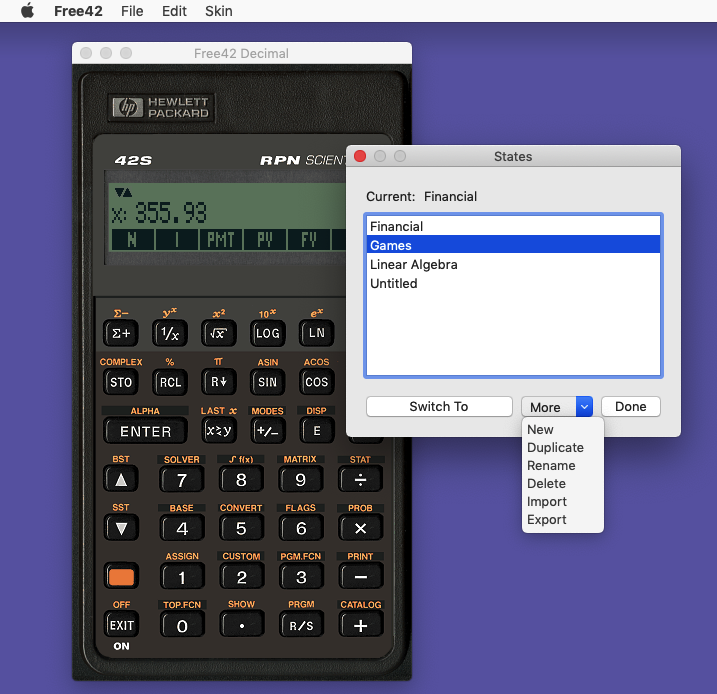
Starting with version 2.5, Free42 allows you to save the calculator's state to
files, share these files between different instances of Free42, and manage a
set of states and switch between them with just a few mouse clicks.
The States command, found in the File menu in the Windows, MacOS, and Linux versions,
and in the main menu in the Android and iOS versions, pops up the States management
window, as seen in the screen shot on the right.
The calculator's state includes all programs and variables, the automatic stack,
the flags, CUSTOM menu, programmable menu, ALPHA register, and all the state
associated with the numerical solver and integrator. You can save a state to
a file with the extension .f42, and load such files, using the Export
and Import commands in the State manager's More menu. States that
have been imported show up in the list of States, and can be activated by double-clicking
them, or clicking them and then pressing Switch To.
Other operations in the States manager include duplicating an existing state,
creating a new, empty state, and renaming an existing state. In addition, the
mobile versions of Free42 offer the option of "sharing" a state, which brings
up a system-provided dialog where you can send the state file in an email.
Note that State files are not the same as the "raw" files used for exchanging
programs. A "raw" file contains one or more programs, but nothing else, and can
be loaded into Free42 without replacing what's already there. A state file, by
contrast, defines the calculator's entire state, and loading a state file
replaces the previously loaded one in memory. You can only work with one state
at a time, but states do let you customize the calculator to a far greater
extent than merely loading a program can.
Binary and Decimal Floating-Point
While Free42 originally used Binary math exclusively, all releases starting
with 1.4 have come in two versions, Binary and Decimal. The two look and
behave identically; the only difference is the way they represent numbers
internally.
The desktop versions of Free42 on this site, that is, the ones for Windows, MacOS,
and Linux, include both the Binary and Decimal versions in the download packages.
The versions for Android and iOS, on the other hand, are Decimal only. They
could in principle be built with Binary math as well, but due to the way the
Android and iOS app stores work, distributing both versions at the same time
would be problematic.
Free42 Decimal uses the Intel Decimal Floating-Point Math Library;
it uses IEEE 754-2008 quadruple precision decimal floating-point, which
consumes 16 bytes per number, and gives 34 decimal digits of precision, with
exponents ranging from −6143 to +6144.
Free42 Binary uses the PC's FPU; it represents numbers as IEEE 754
compatible double precision binary floating-point, which consumes 8 bytes per
number, and gives an effective precision of nearly 16 decimal digits, with
exponents ranging from −308 to +308.
The binary version has the advantage of being much faster than the decimal
version; also, it uses less memory. However, numbers such as 0.1 (one-tenth)
cannot be represented exactly in binary, since they are repeating fractions
then. This inexactness can cause some HP-42S programs to fail.
If you understand the issues surrounding binary floating-point, and you do
not rely on legacy software that may depend on the exactness of decimal
fractions, you may use Free42 Binary and enjoy its speed advantage. If, on
the other hand, you need full HP-42S compatibility, you should use
Free42 Decimal.
If you do not fully understand the above, it is best to play safe and use
Free42 Decimal.
Free42 Extensions to the HP-42S Instruction Set
This section was last updated on April 23, 2025.
The Free42 Extensions can be found in the second row of the CATALOG:
Shift CATALOG ▼.
They are grouped in several sub-catalogs, which correspond with the sections
below.
Contents
Time and Date Functions
Extended Functions
BASE Enhancements
Programming Utilities
String and List Functions
Big Stack
Other Extensions
Accelerometer, GPS, and Compass
Flags
Time and Date Functions
Free42 provides a number of functions for working with times and dates, and
getting the current time and date from the system's real-time clock. These functions
are a subset of the functions from the HP-41 Time Module: ADATE ATIME ATIME24 CLK12
CLK24 DATE DATE+ DDAYS DMY DOW MDY TIME, and one additional function, YMD.
These functions are documented in detail in the HP-82182A Time Module Owner's
Manual and the HP-41CX Owner's Manual, both of which can be viewed on-line
here,
here,
and here.
Note: the date functions handle dates between October 15, 1582, and
September 10, 4320. The former is the first day of the Gregorian
Calendar, and the latter is 999,999 days later.
The format in which the date functions accept and return dates is
MM.DDYYYY when in MDY mode, DD.MMYYYY when in DMY mode, and YYYY.MMDD in YMD mode.
The date format MDY / DMY / YMD, and the time format CLK12 / CLK24, are initially
set (that is, at Memory Clear) so they match the host's locale. This means that,
for example, a new state will initially be in MDY mode in the U.S., in DMY mode
in the Netherlands, and in YMD mode in Japan, and likewise, it will be in CLK12
mode in the U.S., and in CLK24 mode in the Netherlands.
ADATE Appends the contents of the X register to the ALPHA
register, formatted as a date value: in DMY mode, DD.MMYYYY is displayed as
DD.MM.YYYY; in MDY mode, MM.DDYYYY is displayed as MM/DD/YYYY; and in YMD mode,
YYYY.MMDD is displayed as YYYY-MM-DD. In MDY and DMY modes, if the
number of digits of the display mode is 4 or less, the century part is
omitted; if it is 2 or less, the entire year part is omitted; and if it is
0, the months or days part is omitted (in DMY or MDY mode, respectively).
In YMD mode, if the number of digits in the display mode is 2 or less, the
day part is omitted, and if it is 0, the month and day parts are omitted.
ATIME Appends the contents of the X register to the ALPHA register,
formatted as a time value: HH.MMSSss is displayed as HH:MM:SS.ss. In CLK12 mode,
times with HH between −23 and 23 are displayed in 12-hour format: −23 to −13 as
−HH−12 PM; −12 to −1 as −HH PM; 0 as 12 AM; 1 to 11 as HH AM; 12 as 12 PM;
13 to 23 as HH−12 PM. When |HH| ≥ 24, the sign is ignored, and HH is shown
as is, with no AM or PM appended. In CLK24 mode, HH between −1 and −11 are
displayed as −HH+12; all other values are shown as |HH|. No AM or PM are
displayed.
If the number of digits of the display mode is 4 or less, the centiseconds part
is omitted; if it is 2 or less, the seconds part is omitted; and if it is 0,
the minutes part is omitted.
ATIME24 Like ATIME (see above), except it always formats the
time in 24-hour format, regardless of the CLK12/CLK24 setting.
CLK12 Display the time in 12-hour format with AM/PM.
CLK24 Display the time in 24-hour format.
DATE Returns the current date to the X register. In MDY mode,
the date is returned as MM.DDYYYY; in DMY mode, it is returned
as DD.MMYYYY; and in YMD mode, it is returned as YYYY.MMDD. In addition,
when executed from the keyboard, this also displays the date formatted as
"MM/DD/YYYY DOW", "DD.MM.YYYY DOW", or "YYYY-MM-DD DOW", respectively.
DATE+ Takes a date from the Y register, and adds a number of days
from the X register.
DDAYS Calculates the number of days between the date in the Y
register and the date in the X register. If the date in the Y register
is earlier, then the result will be positive.
DMY Display, return, and accept dates in day/month/year
format.
DOW Calculates the day of the week for the date in the X register.
Returns a number from 0 to 6, where 0 is Sunday, 1 is Monday, and so on.
When this function is executed from the keyboard, the day is also displayed
in a human-friendly format, i.e. MON for Monday, TUE for Tuesday, etc.
MDY Display, return, and accept dates in month/day/year
format.
TIME Returns the current time in the X register. The time
is returned in HH.MMSSss format, with HH from 0 to 23, regardless
of the CLK12/CLK24 setting. In addition, when executed from the
keyboard, it displays the time in "HH:MM:SS AM" or "HH:MM:SS"
format, when the display format is CLK12 or CLK24, respectively.
YMD Display, return, and accept dates in year/month/day
format.
Extended Functions
The HP-42S includes many of the functions that were first introduced in the HP-82180A
Extended Functions & Memory Module for the HP-41, but a few functions were omitted
that would have been useful. These were added in Free42 in version 2.5.21.
ANUM Scans the ALPHA register for a number, and places it into
the X register. If a number is found, the numeric input flag, flag 22, is set.
RCLFLAG Gets the state of all flags and returns them as a complex
number. The real part of this number contains flags 0 through 49, and the imaginary part
contains flags 50 through 99, encoded as binary integers with the least significant bits
corresponding to the lowest-numbered flags.
Note that this format does not match the format returned by the RCLFLAG function in the
original Extended Functions & Memory Module or the HP-41CX. The HP-42S has more flags
than the HP-41 and the original encoding would not provide room for all of them to fit.
STOFLAG Restores the state of all flags that were retrieved using
a previous RCLFLAG. Note that this does not affect the following flags: 27 (CUSTOM),
44 (Continuous On), 45 (Solving), 46 (Integrating), 47 (Variable Menu), 48 (ALPHA mode),
49 (Low Battery), 53 (INPUT), 65 (Matrix Editor), and 75 (Programmable Menu).
You can also choose to restore only a range of flags. With the saved flags in the Y
register, and a number bb.ee in X, only flags numbered bb through ee are restored.
X<>F Exchanges flags 0-7 with the X register. The flags
are encoded as a binary integer between 0 and 255, with the least significant bits
corresponding to the lowest-numbered flags.
BASE Enhancements
The BASE application in the HP-42S has arithmetic and bitwise logic operations that work
on 36-bit signed integers. This is not always what's needed, and Free42 2.4 makes BASE
more flexible by offering configurable word size (up to 64 bits in Free42 Decimal; up to
53 bits in Free42 Binary), unsigned mode, and a wrapped mode. Free42 3.3 and Plus42 1.3
add even more functionality, which is documented below, starting at the
Display Options section.
In n-bit signed mode, the numerical range is from −2n−1 to
2n−1−1, and in n-bit unsigned mode the numerical range is from 0 to
2n−1.
Wrapped mode changes the behavior when arguments or results go beyond the aforementioned
ranges. In the standard, non-wrapped mode, arguments outside of those ranges result in
Invalid Data errors, and results outside of those ranges result in Out of Range
errors, unless the Range Error Ignore flag (flag 24) is set, in which case the result is
the closest value from within the range.
In wrapped mode, parameters and results are held within the allowable range by simply
ignoring or discarding any bits to the left of bit n−1. This behavior will be natural to
anyone familiar with the behavior of microprocessors, or of integer arithmetic and bitwise
logic in C and related programming languages.
The following functions, found in the MODES submenu of the BASE menu, are provided to control
the BASE modes:
WSIZE Sets the word size to the number in the X register, which must be
between 1 and 64.
WSIZE? Returns the current word size.
BSIGNED Toggles signed mode. In signed mode, numbers are interpreted as
two's complement signed integers, like on the real HP-42S and in earlier versions of
Free42; in unsigned mode, numbers are always interpreted as non-negative, and negative
numbers do not exist. You can check whether signed or unsigned mode is active by checking
the MODES menu, where there will be a dot marking the BSGN menu item when signed mode is
active. Alternatively, you can check flag 78.
BWRAP Toggles wrapped mode. In wrapped mode, numbers are kept within WSIZE
bits by discarding any bits to the left of bit WSIZE−1; in non-wrapped mode, numbers outside
of the binary range are not allowed and cause Invalid Data errors when parameters
are out of range, or Out of Range errors when results are out of range. You can
check whether wrapped or non-wrapped mode is active by checking the MODES menu, where
there will be a dot marking the BWRP menu item when wrapped mode is active. Alternatively,
you can check flag 79.
BRESET Resets all BASE modes back to their defaults, which match the behavior
of the real HP-42S: WSIZE 36, signed, not wrapped.
Display Options
DECINT When DECM mode is active in the BASE menu, numbers are usually
displayed exactly like they are outside of the BASE menu. This can be inconvenient, like when
large numbers end up being displayed in scientific notation, which is usually not what you want
when working with machine numbers. The DECINT option, found in the DISP submenu of BASE, causes
the normal decimal number formatting options to be ignored while the BASE menu is active, and
displays decimal numbers as plain integers instead.
HEXSEP, DECSEP, OCTSEP,
and BINSEP These options, found in the DISP submenu of BASE, control
whether or not digit grouping is used when the BASE menu is active. There are four settings,
controlling the use of digit grouping separately for HEXM, DECM, OCTM, and BINM modes.
In HEXM, OCTM, and BINM modes, digits are grouped in groups of four, with the groups separated
by spaces. In DECM mode, digits are grouped in groups of three, with the groups separated by
commas or periods, depending on the RDX. or RDX, setting in the main DISP menu. Note: the
DECSEP setting only takes effect if DECINT mode is turned on; when DECINT mode is turned off,
DECM mode displays numbers exactly like they are displayed outside of the BASE menu.
Carry
Several operations in the BASE menu make use of the Carry flag. Specifically, when a
BASE+ operation results in a carry, or a BASE- operation results in a borrow, the Carry flag
is set or cleared accordingly. That is, if BASE+ causes a carry or BASE- causes a borrow,
the Carry flag is set, and if BASE+ does not cause a carry or BASE- does not cause a borrow,
the Carry flag is cleared.
Further, the rotate and shift functions set or clear the Carry flag according to whether a
1 or a 0 was shifted or rotated out of the number, and the rotate-with-carry functions
rotate the number through the Carry flag. This is described in more detail in the
following section.
SC Sets the Carry flag.
CC Clears the Carry flag.
C? Tests the Carry flag. This acts as a normal conditional:
when executing a program, if the Carry flag is set, the following instruction will be
executed, otherwise it will be skipped; and in normal mode, C? displays Yes if the
Carry flag is set, and No if it is clear.
Bit Manipulation
SL
Shift Left: Shift the number in the X register left by one bit. A zero is shifted
into the number from the right, and the bit that is shifted out of the number is
saved in the Carry flag.
SR
Shift Right: Shift the number in the X register right by one bit. A zero is shifted
into the number from the left, and the bit that is shifted out of the number is
saved in the Carry flag.
ASR
Arithmetic Shift Right: In unsigned mode, that is, when BSIGNED mode is off,
this function behaves exactly like SR. In signed mode, however, it performs an
arithmetic shift right, which is equivalent to a signed division by two.
What this means is that rather than shifting a zero into the number from the
left, the leftmost bit, which is the sign bit, is left unchanged, while also
being copied into the next bit to its right.
As with SR, the bit that is shifted out of the number is saved in the Carry flag.
SLN, SRN,
and ASRN
Shift N times: These functions work like SL, SR, and ASR, respectively,
except they perform the shift operation multiple times. The number to be
shifted is taken from the Y register, while the shift count is taken from
the X register; the shifted number is returned in the X register.
These functions can be executed by pressing Shift SL, Shift SR, and Shift ASR,
respectively.
LJ
Left Justify: This function shifts the number in X left repeatedly, until the highest
bit becomes 1. The shifted number is returned in the Y register, and the number
of bits by which it was shifted is returned in the X register. An input of zero
will return zero in both X and Y.
RJ
Right Justify: This function works like LJ, except it shifts the number in X right
repeatedly, until the lowest bit becomes 1.
This function can be executed by pressing Shift LJ.
RL
Rotate Left: This function shifts the number in X left by one bit, taking the bit
that is shifted out of the number from the highest bit and shifting it back in
from the right, while also copying it into the Carry flag.
RR
Rotate Right: This function shifts the number in X right by one bit, taking the bit
that is shifted out of the number from the lowest bit and shifting it back in
from the left, while also copying it into the Carry flag.
RLC
Rotate Left through Carry: This function shifts the number in X left by one bit,
taking the bit that is shifted out of the number from the highest bit and
shifting it into the Carry flag, and taking the previous value of the Carry flag
and shifting it into the number from the right.
RRC
Rotate Right through Carry: This function shifts the number in X right by one bit,
taking the bit that is shifted out of the number from the lowest bit and
shifting it into the Carry flag, and taking the previous value of the Carry flag
and shifting it into the number from the left.
RLN, RRN, RLCN,
and RRCN
Rotate N times: These functions work like RL, RR, RLC, and RRC, respectively,
except they perform the rotation operation multiple times. The number to be
rotated is taken from the Y register, while the rotation count is taken from
the X register; the rotated number is returned in the X register.
SB
Set Bit: Takes the number in the Y register, and in that number, it sets the bit
whose position is given in the X register. The bits are numbered from the right
to the left, starting at zero, so bit 0 is the units bit, bit 1 is twos, bit 2
is fours, etc.
CB
Clear Bit: Like SB (Set Bits), except it clears one bit.
B?
Test Bit: Takes the number in the Y register, and in that number, it checks
the bit whose position is given in the X register. This acts as a normal conditional:
when executing a program, if the bit is set, the following instruction will be
executed, otherwise it will be skipped; and in normal mode, B? displays Yes if the
bit is set, and No if it is clear.
Note: This function consumes the number from the X register, but leaves the number
from the Y register, so the stack drops by one level.
#B
Count Bits: Takes the number in the X register, and returns the number of 1 bits
in its binary representation.
MASKL
Mask Left: Given a number n, given in the X register, this function returns
a bit mask of n 1 bits, aligned to the left (high) end of the word.
MASKR
Mask Right: Given a number n, given in the X register, this function returns
a bit mask of n 1 bits, aligned to the right (low) end of the word.
Floating-Point Conversions
These functions convert floating-point numbers between the representation used by
the calculator internally and six different IEEE 754-2008 floating-point formats.
The floating-point numbers are returned as binary integers, if they fit in the current
word size, or as hex-encoded strings otherwise. Converting from floating-point to
the internal format, the inputs may be binary integers or hex-encoded strings.
N→BS and
BS→N: Convert numbers to and from binary32 (single precision binary)
N→BD and
BD→N: Convert numbers to and from binary64 (double precision binary)
N→BQ and
BQ→N: Convert numbers to and from binary128 (quadruple precision binary)
N→DS and
DS→N: Convert numbers to and from bid32 (single precision decimal)
N→DD and
DD→N: Convert numbers to and from bid64 (double precision decimal)
N→DQ and
DQ→N: Convert numbers to and from bid128 (quadruple precision decimal)
Note that the format used internally by Free42 is bid128 in the Decimal version, and
binary64 in the Binary version.
Other BASE Functions
A...F Sets HEXM mode while also activating the A...F menu.
Programming Utilities
CPXMAT? Tests whether the object in the X register is a complex
matrix. This can be useful when a program needs to distinguish between real and complex
matrices, since MAT? returns Yes for both real and complex matrices, and CPX? returns Yes
only for complex numbers, not for complex matrices.
CSLD? "Caller's Stack Lift Disabled?" Tests whether the 'stack
lift disable' flag (30) was set when the latest XEQ was performed. This can be used when
writing functions that return values on the stack, so they exhibit RCL-like behavior when
called after CLX or ENTER.
ERRMSG and ERRNO These functions return the
error message and error number, resprectively, for the most recent error to be caught using
flag 25. If the error number is outside of the range 1 through 8, the same range that is
accepted by RTNERR, then ERRNO will return the error message instead, identical to what is
returned by ERRMSG.
FUNC Prepare user-defined function.
This function makes it easy to write subroutines that behave like built-in functions,
that is, they only take their parameters from the stack, and return their results to the
stack, and they don't disturb the contents of any of the remaining stack levels.
This is accomplished by saving the stack, and creating a new stack for the function to use.
The new stack will contain only the function's parameters, and once the function returns,
only the function's return values will be taken from the new stack. Anything that's left
on the new stack apart from the return values is discarded.
FUNC takes a two-digit numeric parameter. Each digit can be from 0 to 4. The first digit
indicates the number of parameters consumed by the user-defined function, and the second
digit indicates the number of values returned. For example, for a function that takes two
parameters and returns one result, you should call FUNC 21, and when the function returns,
the two parameters in X and Y (or levels 1 and 2 in NSTK mode) will be replaced by the
one return value, and the original contents of X (level 1) will be saved in LASTX.
The process of replacing the parameters with the return values when the function returns
only takes place if the function returns normally, using RTN, END, RTNYES, or RTNNO.
If the function raises an error by returning with RTNERR, the stack and LASTX are
left unchanged, regardless of the parameter given to FUNC.
FUNC also saves the state of flag 25 and causes it to be restored when the function
returns. After saving it, flag 25 is cleared, so the function itself will always start
with flag 25 clear.
GETKEY1 This function works like the regular GETKEY, except
it does not halt program execution when EXIT or Shift-EXIT are pressed, allowing
programs to implement custom behaviors for those keys. GETKEY1 does halt on R/S, like
GETKEY.
GETKEYA This function works like the regular GETKEY, except
it does not wait for a keystroke if the keyboard buffer is empty, but returns 0
immediately in that case.
LSTO, introduced in Free42 2.2, can be used to create local variables. These
are variables that exist only for the duration of the current subroutine, and are automatically
deleted when it returns. For example, the following is a recursive implementation of the
factorial, using the local variable T to preserve the stack register T, and using the local
variable N to keep track of the parameter across the recursive call to compute FAC(N−1):
  00 { 37-Byte Prgm }
  01▸LBL "FAC"
  02 X≠0?
  03 GTO 00
  04 SIGN
  05 RTN
  06▸LBL 00
  07 R↑
  08 LSTO "T"
  09 R↓
  10 LSTO "N"
  11 1
  12 -
  13 XEQ "FAC"
  14 RCL "N"
  15 ×
  16 RCL "T"
  17 R↓
  18 END
Since local variables make it possible to implement recursive algorithms that the real
HP-42S can't handle, it also becomes much more useful to have a larger return stack.
While the real HP-42S, and older versions of Free42, have an 8-level RTN stack, Free42
2.2 has 1024 RTN levels.
LASTO Relates to LSTO like ASTO relates to STO.
LCLV CLV for local variables. LCLV only deletes local variables
that were created at the current RTN level, making it safe to use without the risk of
deleting local variables from a lower stack level, or global variables. If a local variable
with the given name does not exist at the current RTN level, LCLV does nothing, and does not
raise an error.
The behavior of CLV is complementary: it will delete only global variables, refusing
to delete local variables. If the given name matches a local variable, CLV raises an
error; if it matches no variables at all, CLV does nothing, and does not raise an error.
NOP No Operation. Can be used as a filler when ISG is used
in a way where it will always skip the next instruction, like when using it as a
counter with no upper limit. In raw files, this instruction is encoded as 0xF0,
which corresponds to TEXT 0 in the HP-41, which is sometimes used as a synthetic
NOP on that platform.
PGMMENU PGM Menu. Presents a menu of all global labels that
have MVAR instructions. When the user makes a selection, the label name is placed in
the ALPHA register, and program execution is resumed, similar to the way VARMENU
handles a selection. This function allows programs to implement behavior similar to
the top-level SOLVER and ∫f(x) menus.
PGMVAR Print MVAR variables. This prints all the variables
associated with the given LBL through MVAR declarations, in other words, the contents
of the VARMENU for that label.
RTNERR n Return Error from a function. It raises
an error based on the parameter n, as follows:
  0: No Error
  1: Alpha Data Is Invalid
  2: Out of Range
  3: Divide by 0
  4: Invalid Type
  5: Invalid Data
  6: Nonexistent
  7: Dimension Error
  8: Too Few Arguments
Execution is halted on the XEQ that called the function, unless flag 25 was set, in which
case flag 25 is cleared and execution continues.
If the stack was saved using FUNC, this restores the stack to its initial state,
regardless of the argument given to FUNC.
Instead of an error number, RTNERR also accepts a string to be displayed as the error
message, allowing programs to raise non-standard errors. The string must be provided as
an indirect argument; it can be created using XSTR, as follows:
  XSTR "Custom Error Message"
  RTNERR IND ST X
RTNNO Return from conditional function. To be used by
functions that act as conditionals. RTNNO causes the line after the calling XEQ to be
skipped, or, if the function was called from the keyboard, it will display the message
"No", like a built-in conditional.
RTNYES Return from conditional function. To be used by
functions that act as conditionals. RTNYES is like RTN, except if the function was
called from the keyboard, it will display the message "Yes", like a built-in conditional.
SKIP Skips the next line, like a test that always tests false.
This can be used to invert the sense of tests that have no convenient inverse; for example:
REAL? SKIP GTO 42 will jump to LBL 42 if the object in X is not a real number.
Step Into, Step Over, and Step Out
Introduced in release 2.1, Free42 offers Step Over and Step Out. People familiar
with Integrated Development Environments (IDEs) will probably know the three
common types of stepping:
SST↓ or Step Into: Executes one line of code, and if the line in question is
a function call, the next line to be executed will be the first line
of the function being called. That is, you are Stepping Into the function;
SST→ or Step Over: Executes one line of code, and if that line is a function call,
it is executed in that one step. You are not Stepping Into the function;
rather, you are Stepping Over it.
SST↑ or Step Out: Starts program execution, continuing until just after the end
of the current function. You are Stepping Out of the function.
Step Into is the same as the original SST function in the HP-42S. Free42 2.1 adds
the alias SST↓ for this function, but its behavior is the same, because it's just
another name for the same function. Step Over and Step Out are new functions in 2.1.
The three together can be assigned to a row in the CUSTOM menu, for example:

A note about Step Over: for most instructions, Step Over behaves the same as Step Into.
In high-level language debuggers, the only difference between the two is with function
or method calls. In Free42, Step Over steps over XEQ instructions, those being the
keystroke-programming equivalent of function calls, but it also steps over SOLVE and
INTEG, while Step Into will step into the function being solved or integrated.
Conversely, if you interrupt program execution while SOLVE or INTEG are active,
Step Out will cause execution to continue until SOLVE or INTEG are done, as if SOLVE
or INTEG are a kind of XEQ.
TYPE? Returns an integer, representing the type of the object in
the X register. The numbers correspond to object types as follows:
   1: Real Number
   2: Complex Number
   3: Real Matrix
   4: Complex Matrix
   5: String
   6: List
In Plus42, these additional object types exist:
   7: Equation
   8: Unit
   9: Directory Reference
  10: Program Reference
  11: Variable Reference
VARMNU1 Modified version of VARMENU, with two differences:
You can select a variable without having to assign any values first, so you don't have
to press the menu key twice if all you want to do is make a selection; and also, it
catches EXIT, clearing the ALPHA register and resuming program execution when it is
pressed.
X=? X≠? X<?
X>? X≤? X≥?
Compare X to any argument. Similar to X=Y?, X≠Y?, etc., except these functions allow you
to compare X to any register or variable, not just to Y.
0=? 0≠? 0<?
0>? 0≤? 0≥?
Compare any argument to 0. Similar to X=0?, X≠0?, etc., except these functions allow you
to compare any register or variable to 0, not just X.
String and List Functions
Free42 3.0.6 adds functions that work with unlimited-length strings, on the stack, and
a new list data type, which is an ordered collection of objects of any type, including
other lists.
List Editing
Free42 3.1 introduces full support for list editing in the matrix editor functions
EDIT, EDITN, and INDEX. While editing lists, the matrix editor's user interface looks
mostly the same as when editing matrices, but with a few important differences.
The format of the X register label, which looks like row:column=
when editing a matrix, now supports lists, nested lists, empty lists, and matrices within lists,
with these formats:
1= first item of the top-level list
1.2= second item of the list, which is the first item of the top-level list
1.2.3= third item of the list, which is the second item of the list, which is the first item of the top-level list
etc.
1:1= top-left element of the top-level matrix
2.1:1= top-left element of the matrix which is the second element of the top-level list
etc.
When editing a list, when the current list item is also a list, pressing the → menu key will enter that list;
When editing a list, when the current list item is a matrix, pressing the → menu key will enter that matrix;
When editing a nested list, pressing EXIT or pressing the ← menu key will go to the enclosing list;
When editing a matrix inside a list, pressing EXIT will go to the enclosing list.
When editing an empty list, the item number is shown as the letter E (as in "empty").
Note that you can't store an item in an empty list without extending it first. You can add
new slots anywhere in the list using the INSR function, and you can add slots at the end
of the list by turning on GROW mode and pressing → while at the end of the list.
Functions
APPEND Adds the object in X to the string or list in Y and
returns the combined string or list. If Y is a string, the contents of X will be converted
to a string in the same way as ARCL. If Y is a list, X will be added to it unchanged.
If X is a list, it will be added to Y as one element.
EXTEND Adds the object in X to the string or list in Y and
returns the combined string or list. If Y is a string, the contents of X will be converted
to a string in the same way as ARCL. If Y is a list, X will be added to it unchanged.
If X is a list, it will be added to Y element by element.
SUBSTR From the string or list in Z, gets the substring/sublist
starting at index Y and ending just before index X. If X and/or Y are negative, they are
counts from the end, rather than the beginning. The very end of the string or list can be
specified by leaving off the 'end' parameter, i.e. by having the string or list in
Y and the starting index in X.
LENGTH Returns the length of the string or list in X.
HEAD Removes and returns the first character or element from
the string or list named by the function's parameter. If the string or list is empty,
skip the next instruction.
REV Reverse the string or list in X.
POS Finds the first occurrence of the string or list X in Y.
Or with three parameters: find the first occurrence of string or list X in Z, starting
the search from position Y.
S→N, N→S, and NN→S
Convert string to number or number to string, like ANUM and ARCL.
NN→S works like N→S, except it works as if it's always in ALL mode, and it converts the number
with the calculator's full precision — that is, without limiting the mantissa to 12 digits.
C→N and N→C convert character to number
or number to character, like ATOX and XTOA.
XASTO and LXASTO Like ASTO and LASTO,
but the entire ALPHA register, not just the first 6 characters.
→LIST Creates a list from objects on the stack. The number of
objects is taken from the X register (level 1), the objects themselves are taken from
the levels above X. They are stored in the list in the order in which they were pushed,
so the objects from the highest levels come first in the list.
LIST→ Performs the inverse of the →LIST operation.
LIST? Tests whether the object in X is a list.
NEWLIST Returns a new empty list.
XSTR Create a string directly in the X register, without needing
the ALPHA register and without the six-character limit of ASTO.
Note: When you enter an XSTR command on the keyboard, whether in RUN or PRGM mode, you
are limited to entering strings of no more than 22 characters. (In Plus42, the limit
is 50 characters.) XSTR can handle longer arguments, up to 65535 characters, but for
anything longer than 22 characters, you'll have to enter the text outside of Free42,
then copy it, then switch to Free42 and paste the text into the X register, and finally,
if you want to enter the text into a program, use X2LINE to create the XSTR command.
XVIEW This function works just like AVIEW, except it
takes the text from the X register rather than the ALPHA register, so it
doesn't have the 44-character length restriction of AVIEW.
XVIEW requires the X register to contain a string. This is not intended as a
replacement for VIEW ST X; it's meant to make it possible to display longer
messages than what AVIEW can handle.
Big Stack
Free42 3.0 introduces the option of using a dynamic stack, also known as Big Stack. In
this mode, the stack can grow arbitrarily deep, limited only by available memory. This
is similar to the stack in the HP-28/48/49/50 series calculators.
Big Stack mode is quite powerful, but please be aware that existing programs will
typically not work correctly in this mode, since they expect the fixed four-level stack.
Use this mode only for programs you have verified to be compatible, or for programs
specifically written for Big Stack mode.
In order to prevent users from unwittingly using this mode, it is initially disabled;
before being able to use it, you must first select the option Allow Big
Stack (NSTK) mode in the Preferences. Once this is enabled, you may switch back
and forth between the classic four-level stack and the new dynamic stack using the
4STK and NSTK functions, found in the MODES menu.
In the CATALOG, there is a STK section, containing functions for working with the Big
Stack. The STK functions are:
NSTK N-level Stack. Turns on big stack mode.
4STK 4-level Stack. Turns off big stack mode, returning to the TZYX stack.
LNSTK and L4STK Local N-level / 4-level
Stack. These switch to N-level or 4-level stack mode, respectively, but in addition, they
automatically restore the previous stack mode when the current function returns. Further,
L4STK saves levels 5 and up in a hidden list, and also restores them when the previous
stack mode is restored. (The non-local 4STK function simply discards levels 5 and up.)
NOTE: In Free42 (but not in Plus42), Allow Big Stack (NSTK) mode must be turned on
in the Preferences in order to use the NSTK or LNSTK functions. If not, you will get the
Big Stack Disabled error message when trying to use them.
The NSTK, 4STK, LNSTK, and L4STK functions do nothing if the selected stack mode is already active.
Note that LNSTK or L4STK may be called after FUNC, to create functions that use the N-level
stack or the 4-level stack internally, respectively, while being able to be called from either
N-level or 4-level code. LNSTK or L4STK must be called after FUNC; if FUNC is called
after L4STK or LNSTK, an Invalid Context error is raised.
DEPTH Returns the current stack depth.
DROP and DROPN n Drops level 1, or
levels 1..n. In 4-level mode, the stack is replenished with zeroes from the top.
DUP and DUPN n Duplicates level 1,
or levels 1..n. In 4-level mode, n must be 2 or less.
R↓N n and R↑N n Rolls levels 1..n
down or up. Note that the standard R↓ and R↑ are equivalent to R↓N depth and R↑N depth.
PICK n and UNPICK n Gets the object
from level n, or puts an object into level n. Note that UNPICK consumes the contents of
level 1, unlike STO, and n refers to the stack level number after X has been dropped.
The effect is that you can modify an object at level n by doing PICK n, <modify the
object>, UNPICK n, without having to add 1 to the level number for UNPICK. Also note
that this is similar to the behavior of PICK and UNPICK in RPL.
Other Extensions
A2LINE, A2+LINE, and X2LINE
Create program lines containing the current contents of the ALPHA register, to be set;
the ALPHA register, to be appended; and X register, respectively.
Note that A2LINE may insert seemingly redundant CLA and append lines; these are used
to avoid creating string lines that start with character codes 127 through 255. This is
necessary because those codes have special meanings in HP-42S program format: code 127
signals that the line is an append line, and codes 128-255 are used to encode functions
with string arguments (like STO "ABC") and various other HP-42S- and Free42-specific
functions.
CAPS and Mixed
Select whether to display menu labels in all caps, or allow lowercase letters.
The HP-42S displays menu all menu labels in all caps, because its menu font doesn't have
lowercase letters. Free42, however, has had lowercase letters in its menu font since
release 3.0.6. The CAPS setting can be used to preserve the original HP-42S look; the
Mixed setting is the new default.
These settings can be found in the MENUS submenu of the MODES menu.
STATIC and DYNAMIC
Select whether menus item labels can change when Shift is pressed.
Some menu items, like all six items in the TOP.FCN menu, the XEQ item in the PGM.FCN
menu, and the Σ+ item in the STAT menu, execute different functions depending on
whether Shift is pressed or not. Starting in version 3.3.3, Free42 will update these
menu items when Shift is pressed or released, to indicate these shifted functions. The
STATIC setting can be used to preserve the original HP-42S behavior; the DYNAMIC
setting is the new default.
These settings can be found in the MENUS submenu of the MODES menu.
C.LN1+X and C.E↑X-1
These are complex-capable versions of the HP-42S LN1+X and E↑X-1 functions.
FMA Fused Multiply-Add. Calculates Z*Y+X using the underlying
platform's native FMA function, as provided by the floating-point hardware or library.
GETMI, PUTMI, GETLI,
and PUTLI These functions allow direct access to matrix and list
elements, that is, without needing to use INDEX and RCLEL/STOEL. All four functions take
the matrix or list to be accessed as the argument, e.g. GETMI "MAT", PUTMI IND 00,
PUTLI ST Z. The other parameters are taken from the stack, as follows:
GETMI: Expects a row index in Y and a column index in X; pushes the indexed item
onto the stack.
PUTMI: Expects a row index in Z, a column index in Y, and an item in X, and
stores the item at the specified indices.
GETLI: Expect an index in X; pushes the indexed item onto the stack.
PUTLI: Expects an index in Y and an item in X, and stores the item at the
specified index.
Note that none of these functions remove their arguments from the stack. That is
a deliberate design decision, intended to make read-modify-write interactions
easy to code.
IDENT App identification. This returns the app version as an
integer in aabbccdd format, with 3.1.12b being formatted as 3011202, for example. Free42
returns the version as a positive number, and Plus42 returns it as a negative number.
LOCK and UNLOCK Program locking.
When you perform LOCK, the current program is protected against editing. This is indicated
by the current line indicator changing from a black triangle to a gray one.
You can always make the program editable again later by performing UNLOCK. This
feature is meant purely to prevent accidental editing, not to make a program permanently
unmodifiable.
LOCK and UNLOCK must be executed in PRGM mode. They affect only the current program,
so if you want to lock or unlock multiple programs, you have to do them one at a time.
PCOMPLX and RCOMPLX These functions work
like COMPLEX, except PCOMPLX always works in polar mode, and RCOMPLX always works in
rectangular mode, regardless of the RECT/POLAR mode setting (flag 73) that is currently
in effect. This can be useful when complex constants need to be embedded in programs,
allowing such code to work correctly in either mode.
PRREG Prints the numbered registers.
STRACE Stack Trace mode. This turns on a new print mode,
which is a variation on TRACE mode, printing the entire stack instead of just X. This
can be a valuable debugging tool, but it generates large amounts of output!
ΣX,
ΣX2,
ΣY,
ΣY2,
ΣXY,
ΣN,
ΣLNX,
ΣLNX2,
ΣLNY,
ΣLNY2,
ΣLNXLNY,
ΣXLNY, and
ΣYLNX Get statistics sums by name. This allows code that
performs calculations using these sums to access them in a way that is easy to read,
and that works regarless of the ΣREG setting. (Note: N is called ΣN, in order to
distinguish it from the TVM N function in Plus42.)
WIDTH and HEIGHT These functions
return the width and height of the display, in pixels. Since the display in Free42,
just like the one in the HP-42S, has a fixed size, WIDTH always returns 131, and
HEIGHT always returns 16. This may not seem very useful at first glance, but these
can be used when writing programs that are intended to run in Plus42 as well. Using
WIDTH and HEIGHT instead of hard-coding 131 and 16 allows programs to take advantage
of Plus42's resizable screen while remaining compatible with the fixed-size screen
in Free42.
Accelerometer, GPS, and Compass
Free42 for Android and iOS have three functions to query the device's hardware. They are:
ACCEL Query the accelerometer. The three components of the
acceleration vector are returned in the X, Y, and Z registers. Holding the
device facing you, in portrait orientation, and the dock connector
pointing towards the floor, positive X is acceleration toward the left,
positive Y is acceleration downwards, and positive Z is acceleration
away from you — or, in terms of gravity, positive X is gravity pulling
to the right, positive Y is gravity pulling upwards, and positive Z is
gravity pulling toward you.
Note: Accelerations are returned in units of Earth gravities, not
m/s2 as you might expect. The iOS API documentation states that the unit used is
9.81 m/s2, and those values are returned unchanged by the ACCEL function.
On Android, the API returns the accelerations in m/s2, and these are
converted by Free42 to gravities using the "standard gravity" of 9.80665 m/s2.
LOCAT Query GPS.
The location is returned as follows: latitude in X, longitude in Y,
elevation in Z, and horizontal and vertical accuracy in a two-element
vector in T. The latitude and longitude are given in decimal degrees, with
North and East being positive; the elevation and accuracies are given in
meters. If an accuracy is −1, that means that the corresponding measurement
is not valid.
Note: When LOCAT is first called, it activates the GPS if it wasn't active already. The
GPS will not return a fix immediately; rather, the operating system will notify the app
whenever a new fix is available. For the first fix in particular, this may take a long time,
several seconds, or, if conditions are poor, even a minute or more. LOCAT simply returns
the coordinates of the most recent fix the app has received, and if no fix at all has been
received yet, it will return zeroes, and the location accuracy (the first component in
the accuracy vector returned in the T register) will be -1.
HEADING Query the compass. This returns the following data: magnetic
heading in X, true heading in Y, heading accuracy in Z, and the raw
magnetic vector in a three-element vector in T. The headings and accuracy
are given in degrees, where North is 0, East is 90, and so on; the components
of the magnetic vector are given in microteslas. The components are oriented
with respect to the device along the same axes as the accelerometer
readouts.
Flags
Free42 uses the following flags, in addition to the ones used by the HP-42S:
31 and 67: DATE mode. 67 set: YMD; 67 clear and 31 set: DMY; 67 and 31 clear: MDY.
64: Shift pressed. Indicates that Shift was pressed with the current keystroke.
This can be used to define unshifted and shifted functions with the programmable
and CUSTOM menus.
78: BSIGNED mode for BASE.
79: BWRAP mode for BASE.
80: Big Stack mode.
HP-42S Undocumented [MIN], [MAX], and [FIND] Functions
The HP-42S has three undocumented matrix functions, [MIN], [MAX], and [FIND].
They are not mentioned in the HP-42S Owner's Manual, but they are functional.
Note that the brackets are part of the function names.
[MIN] finds the lowest element of the current column, starting at the current
row, of the indexed matrix, and returns the element to X and the row where it
was found to Y;
[MAX] is like [MIN] except it finds the highest element; if the
minimum or maximum is not unique (it is found in more than one row), the
highest matching row is returned. [MIN] and [MAX] require the indexed matrix to
be a real matrix, and they do not allow string elements in the column being
searched.
[FIND] locates a specific value, searching the indexed matrix left to right and
top to bottom. The function works as a conditional: when a program is running,
the following instruction is executed if a match is found, and skipped if a
match is not found; when executed interactively, the display shows "Yes" if a
match is found and "No" if not.
Also, if a match is found, I and J are set to point to it.
The indexed matrix may be real or complex, and the search value may be real,
complex, or string; real or string values are only found in real matrices, and
complex values are only found in complex matrices; in other words, 5 is not
considered equal to 5 + 0i -- mathematically speaking this is wrong, but on the
other hand it is consistent with the behavior of the X=Y? and X≠Y? functions.
Frequently Asked Questions
This FAQ was last updated on January 29, 2025.
Contents
Why does my HP-42S program not work properly in Free42?
Do the Android and iOS versions have a menu?
I can't access the main menu in the Android or iOS version!
Why does Haptic Feedback not work on my iPhone / iPad / iPod touch?
Why does OFF not work in the iOS version?
Why am I getting results that are rounded to integers?
Why am I getting Size Error when I try to access any of the numbered storage registers, or try to use any of the statistics functions?
How do I assign SST↓ (Step Into) to the CUSTOM menu?
Why is nothing showing up in the Print-Out?
How do I get rid of "Free42" would like to paste from "SomeOtherApp" warnings on iOS?
I use a Bluetooth keyboard with my iPhone or iPad, and the cursor keys aren't working!
I use a Bluetooth keyboard with my iPad, and sometimes the app stops responding to the keyboard completely!
How do I enable iCloud support in the iOS version?
Why does my HP-42S program not work properly in Free42?
There are several potential reasons why an HP-42S program might not work
correctly in Free42. To get the most obvious out of the way first: make sure to
check that you entered the program correctly, and that the relevant settings,
such as register size, angular and display modes, etc., are all correct.
Having ruled out human error, the reasons an HP-42S program may not work correctly in Free42 are:
-
Different floating-point format
The HP-42S represents numbers with a 12-digit decimal mantissa, and an
exponent from 10−499 to 10499; Free42 Decimal uses a 34-digit decimal
mantissa, and an exponent from 10−6143 to 106144; and Free42 Binary
uses native binary floating-point, which on all currently supported
platforms is IEEE-754 double precision, with a 53-bit binary mantissa which
is roughly equivalent to 16 decimal digits, with an exponent from 10−308
to 10308.
These differences can cause Free42 to calculate different results than the
HP-42S. For example, 1 ENTER 3 1/x − LASTX − LASTX − returns 1e−12 on the
HP-42S but 1e−34 on Free42 Decimal, because of the wider mantissa; 1 ENTER
.2 − .2 − .2 − .2 − .2 − returns 0 on the HP-42S but 5.55111512313e−17 on
Free42 Binary, because 0.2 is a repeating fraction in binary.
Most of these kinds of compatibility problems can be avoided by using
Free42 Decimal, but, although they are rare, there are programs that don't
work correctly even in Free42 Decimal. Mostly these are programs that
specifically rely on the size of the mantissa and/or the range of the
exponent, but the extra precision of Free42 Decimal can also potentially
throw off straightforward numerical algorithms, for example, if they use
termination conditions that aren't robust.
-
Free42 defaults to decimal-point or decimal-comma mode depending on locale
If your computer / smartphone / tablet is set to a locale where the decimal
is a comma, Free42 is set to RDX, (radix comma) mode on hard reset;
in all other locales, it is set to RDX. (radix dot) mode on hard
reset. If you're seeing incorrectly formatted data in your program's
output, you may have to switch to RDX. mode (RDX. in the DISP menu, or SF 28).
The Android and iOS versions do have a menu, where you select skins, access
the Preferences, etc. To activate this menu, tap on the screen, anywhere below
the status bar (or the top of the screen if there is no status bar) down to
the top half of the display.
When the Pop-up ALPHA keyboard is enabled, the sensitive area in the top of
the screen is used to toggle the keyboard as well; tap in the top left to
bring up the main menu, and tap in the top right to toggle the keyboard.
If you set the Pop-up ALPHA keyboard to "disabled" in the Preferences, the
older behavior is restored, and the entire top-of-screen area triggers the
main menu.
Free42 3.2 and Plus42 1.2 introduced the pop-up ALPHA keyboard. Starting with these
versions, you access the main menu by tapping in the top
left of the screen,
while tapping in the top
right of the screen turns the pop-up keyboard on and
off.
If you don't want to use the pop-up ALPHA keyboard at all, you can go into
Preferences, and set the "Pop-up ALPHA keyboard" setting to "Disabled." This will
restore the old main menu behavior.
Why does Haptic Feedback not work on my iPhone / iPad / iPod touch?
The hardware and OS support needed for Haptic Feedback is currently only available
on the iPhone 7 and later. Older iPhone models don't have it, and neither do any
iPad or iPod touch models.
Unfortunately, iOS does not provide apps with a way to detect whether the devices
they're running on have Haptic Feedback support or not, and so, in order to make
sure that the option is available on all devices that do have that
support, I have no choice but to put the Haptic Feedback switch in the
Preferences screen on all devices.
If Apple ever adds a way to detect Haptic Feedback support, I'll change the
Preferences screen so the Haptic Feedback switch is hidden or disabled on
devices where it's of no use, but until then, the current confusing situation
will continue. My apologies!
Why does OFF not work in the iOS version?
Apple's User Interface guidelines for iOS specify that apps should not have
commands for exiting the app; exiting should only take place at the
operating system's request, which in turn will only happen when the user
presses the home button or uses the task switcher. Thus, the Free42 OFF
command causing the app to exit was a violation of those guidelines.
For the longest time, Apple didn't seem to mind, but when I submitted
1.4.75a, it was rejected because of this issue. I had no choice but to
comply, and so now, OFF just beeps, and OFF in a program causes the program
to stop.
For people who liked and used the original OFF functionality, I added a
back door to re-enable that behavior. Follow these steps:
Enter ALPHA mode: Shift ALPHA
Type YESOFF using the ALPHA menu: WXYZ Y ABCDE E RSTUV S NOPQ O FGHI F FGHI F
Store the text in the X register using ASTO ST X: STO . ST X
Perform OFF: Shift OFF
With the string YESOFF in the X register, OFF works again. You only have to
do this once; executing OFF this way sets a hidden flag telling Free42 to
always perform the old-style OFF behavior from then on, regardless of the
contents of the X register.
If you ever uninstall and reinstall Free42, you will have to repeat the
procedure. You will not have to repeat the procedure when you get updates.
Why am I getting results that are rounded to integers?
You're doing, say 7 ENTER 2 ÷, in FIX 04 mode, and the result is 3.0000, while it
should of course be 3.5000.
When this happens, it's because the calculator is in BASE mode. You can verify
this by pressing and holding any of the arithmetic or +/− keys: in BASE mode,
they perform BASE÷, BASE×, BASE−, BASE+, and BASE+/−, respectively, and these
commands interpret their arguments as 36-bit signed binary integers, and return
results within those same constraints.
To get back to normal behavior, leave the BASE application by pressing EXIT until
no menu is shown in the display.
Why am I getting Size Error when I try to access any of the numbered storage registers, or try to use any of the statistics functions?
Usually, Size Error means you're trying to access a numbered register that doesn't
exist, i.e. the SIZE setting (in the MODES menu) is set too low. By default, the
setting is SIZE 0025, which means you have registers numbered from 00 through 24.
When even RCL 00 returns Size Error, however, that usually means that the REGS
matrix was inadvertently deleted. This also causes all statistical functions to
fail, since they all use numbered registers to access the summation data.
To fix this, and restore REGS to its default size, say SIZE 0025: Shift MODES
▼ SIZE 0 0 2
5.
How do I assign SST↓ (Step Into) to the CUSTOM menu?
SST↓, also known as Step Into, introduced in Free42 2.1, is not a new function;
rather, it is a new spelling of the existing SST function. Since functions are
listed in the FCN catalog by their primary spelling only, this leads to the question
of how to assign SST↓ to the CUSTOM menu,
with the arrow.
The answer is to spell it out using the ALPHA menu: Shift ASSIGN ENTER RSTUV S RSTUV S RSTUV T
▼ ←↑↓ ↓ ENTER, and then press the
menu key you want to assign SST↓ to.
Why is nothing showing up in the Print-Out?
Like the HP-42S, Free42 is in Printer Off mode by default. To enable printing,
use the PRON function in the PRINT menu: Shift PRINT ▲ PON.
How do I get rid of "Free42" would like to paste from "SomeOtherApp" warnings on iOS?
From the iOS launcher, go to Settings → Apps → Free42 (in earlier versions of iOS, go to
Settings → Free42), and set the "Paste from Other Apps" option to "Allow."
I use a Bluetooth keyboard with my iPhone or iPad, and the cursor keys aren't working!
It sounds like the system is intercepting those keystrokes. Go into Settings → Accessibility →
Keyboards → Full Keyboard Access, and check the state of the Full Keyboard Access switch. If it
is turned off, then this FAQ entry does not apply. If it is turned on, then you can try turning
it off, or, if you need Full Keyboard Access, go into Commands, and remove or change the
shortcuts that use the cursor keys.
I use a Bluetooth keyboard with my iPad, and sometimes the app stops responding to the keyboard completely!
This can happen when you are running two apps side by side in Split View or Slide Over mode.
If the other app has a text field with a blinking cursor, keyboard input will be sent to that
app, even if you just activated Free42. In order for Free42 to be able to receive the keyboard
input, go into the other app, and make sure the text field is no longer active, by tapping
anywhere outside of all text fields. Then go back into Free42, and it should be responsive to
the keyboard now.
How do I enable iCloud support in the iOS version?
The short answer is: you can't.
You may have noticed that the Settings → Apps → Free42 → Document Storage setting has
no effect. Even if you change it to iCloud, Free42 keeps storing state files, skins,
printer output, and other files, in the local Free42 directory under On My iPhone.
The reason for this is that Free42 needs to keep these files local, in order to make sure
it can operate reliably even when access to the Internet is interrupted or slow. It does
allow access to these files through the Finder on a connected Mac, or to the Files app
running locally, but unfortunately, allowing that access has the side effect of making the Document
Storage setting appear in Settings → Apps → Free42 as well, even if the app doesn't actually
support that setting.
Note that it is possible to share state files and raw program files, using Main Menu →
States → <State Name> → More → Share, and Main Menu → Program Import & Export
→ Share Programs, respectively; and Free42 will also receive shared states and raw files.
Back to FAQ Contents